Opening the account takes a few minutes. The part that bites is that the country you select at sign-up has to match the document you will later verify with. Get that wrong and nothing complains at the time. It surfaces at your first withdrawal or a compliance review, which is the worst possible moment to discover it. The referral code works the opposite way round: it can only be entered during sign-up, and after that it is generally gone for good.
What follows is ordered the way the process actually runs, not the way a form is laid out. Decide whether you can open an account. Decide which identity will carry it. Then, and only then, start clicking. Wherever a figure or a policy is involved, we point you at the page that settles it, because those move faster than any guide gets updated.
Seven things between you and a working account
1. Three things to settle first
Whether the platform serves your region, which document you hold, and whether you can produce proof of address. Those three set the ceiling for the account. None of them blocks you on the day you register. All of them can stop you later.
Does the platform still serve where you are
Availability is not a fixed list. Platforms withdraw from jurisdictions, restrict individual products rather than the whole service, and occasionally reverse course. A guide that names countries is out of date the month it is published, so this one does not. The reliable check takes thirty seconds anyway: open the sign-up page, pick your region in the country selector, and see what happens. If the platform does not serve it, the selector says so before you have typed anything. Doing that first is free; finding out after verification is not.
Which document will carry the account
This is the decision people get wrong, and it is the one that is hardest to undo. Whatever place issued the document you intend to verify with is the region you should select. Not where you live now, not where you happen to be sitting, not where the exchange has better fees.
The reason is mechanical.
Verification is the know-your-customer check, and it compares the region on your account against the issuing authority of the document. When they disagree, automated review rejects it and a human reviewer usually cannot override it either.
Proof of address, eventually
You will not be asked for it on day one. Raise a limit, trigger a review, or use certain funding routes, and it appears — normally a utility bill or bank statement from the last three months showing your name and address as they appear on the account.
Worth knowing now rather than later: if the only bills in your household are in someone else's name, that is a problem to solve before you need the document, not during a review that has already frozen a withdrawal.
2. Where the referral code goes
On the sign-up form the referral field is collapsed behind a link. Something like "Have a referral code?" — and it is easy to submit the form without ever having seen it. That is the whole trap. Most people who miss it did not decide to skip it; they simply never opened the section.
What the code changes
It affects your trading fees. An account created with a code is eligible for a fee reduction under whatever promotion the platform is running, with the top tier commonly quoted at around 20%. Note the word "up to": the share that actually lands on your account is set by the platform's current rules, varies by product line, and is whatever your own fee page says once you are logged in.
Another way to see it: you were going to pay the fee anyway. The code means part of it is waived, out of what the platform has already collected. Nothing is added to your side of the ledger.
Paste it into the "Referral code" field. The one you have to expand before it appears.
If you would rather not type it, this entry point already carries the code: go to the Binance sign-up page. To be clear: that link carries our referral parameter — signing up through it costs you nothing extra. The full mechanics are on our disclosure page.
Skipping it is a perfectly reasonable choice. Go to the exchange directly, enter no code at all, and nothing here is withheld from you. What you give up is the fee reduction the code carries. That trade is yours to make.
Confirming it actually attached
Do this once, right after the account opens, while you can still do something about it. The referral or rewards section of your account shows whether a referrer is recorded. If the field is empty, it did not take, and on most platforms that is not something support will retrofit.
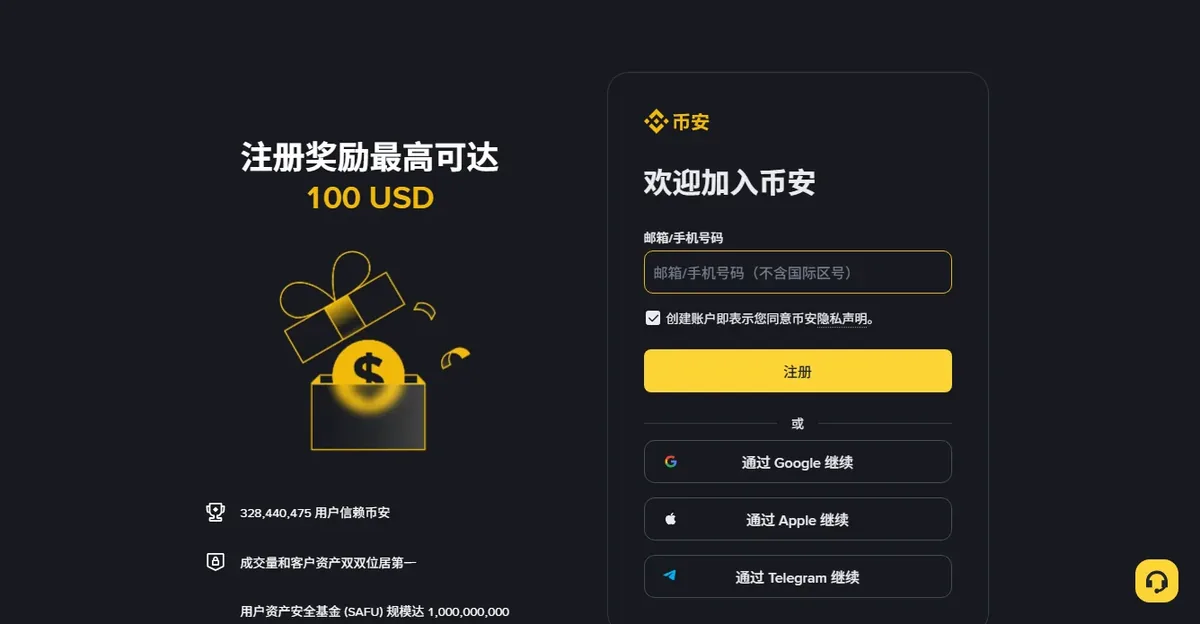
3. Signing up, step by step
Check the domain before you type anything
Phishing pages for large exchanges are convincing and they are bought as search ads. Reach the site through a bookmark you made yourself or a link you have reason to trust, and glance at the address bar before entering credentials. This costs one second and prevents the single most expensive mistake on this page.
Email or phone
Either works. Pick the one you expect to still control in five years. Recovery flows hang off this identifier, and losing access to it while the account holds a balance is a genuinely bad afternoon.
Personal preference, offered as a preference and not a rule: email tends to age better. Phone numbers get recycled when you change country or carrier, and reclaiming an account tied to a number someone else now owns is far harder than it sounds.
The password
Long, unique, stored in a password manager. Not a variation of one you use elsewhere. Exchange credentials are a specific target for credential-stuffing lists, and reuse is what makes those lists profitable.
Submitting
Country selector set to the issuing region of your document. Referral field expanded and filled if you want it. Then submit, verify the email or SMS code, and you are in.
4. Verification without the retries
Most rejections are photography, not eligibility. Getting the images right the first time avoids a queue that gets slower with each resubmission.
Photographing the document
- Flat surface, even indirect light, no flash. Glare across a hologram reads as tampering to an automated checker.
- All four corners inside the frame, with a margin. Cropping to the edge is a common auto-reject.
- The original document, not a photocopy and not a photo of a screen. Both are detected.
- Sharp enough that you can read the small print yourself. If you cannot, neither can the reviewer.
The liveness check
Plain background, no hat, no glasses, face evenly lit. Follow the on-screen prompts at a normal speed. Going too fast is a surprisingly frequent cause of failure, because the capture never gets a clean frame.
Consistency
Every field you type has to match the document exactly. Name order, spelling, accents, date format. "Close enough" is not a category the automated comparison has.
Middle names and multiple surnames are where this goes wrong most often. Enter them the way the document prints them, even where that looks odd in your own language.
5. Four settings for day one
Do these before you fund the account, not after. Each closes a door that is otherwise standing open.
- Authenticator-based two-factor. An app, not SMS — CISA and Google's own documentation both spell out how to set one up. SIM swapping is a real and well-documented attack, and SMS is the weakest option the platform offers.
- A withdrawal address whitelist. This is the setting that limits the damage when everything else has already failed. With a whitelist and a cooling-off period, an attacker with full access still cannot send funds to an address you did not pre-approve.
- An anti-phishing code. A short phrase the platform includes in its genuine emails, which turns phishing from a judgement call into a lookup. Any message without it is not from them, which turns a judgement call into a lookup.
- Turn off what you do not use. Margin, futures, API keys. Every enabled feature is another surface; disable them until you have a reason.
Full detail on each of these, including the order to set them in, is in four doors to lock on day one.
6. When it gets rejected
The error message is rarely specific. Work backwards from the symptom instead, which is what the rejection guide does case by case. The short version:
- "Information unclear" is usually image quality. Glare, blur, or a cropped corner.
- "Information does not match" is a typed field disagreeing with the document.
- Region-related rejections usually mean the document type is not accepted for the region you selected, and that is not fixed by resubmitting.
Before you contact support
Have the account identifier, the approximate time of the attempt, the exact error text, and what you have already tried. A ticket with those four things gets a useful reply. A ticket saying "verification failed, please help" gets a template.
7. A small run before anything else
Once the account is open and verified, move a small amount in and straight back out again. Small enough that losing it entirely would be irrelevant to you.
The point is not the money. It is finding out where your particular combination of bank, region and document gets stuck — and finding out while the stakes are trivial rather than during a transfer that matters. Deposit routes are covered in deposits and withdrawals, and what the round trip actually costs is in how fees stack.
Common questions
Do I have to enter a referral code to sign up?
No. The field is optional and the account will open without it. The difference is that an account created with a code is usually eligible for a trading fee discount and one created without it is not. The catch is timing: on most platforms the field is writable only during sign-up, and cannot be filled in afterwards.
I picked the wrong country at sign-up. Can I change it?
Usually not from your own settings. It generally takes a support ticket plus documents proving the new region, and approval is not guaranteed. The more realistic move is to decide before you register: whichever place issued the document you will verify with is the one to select.
How long does verification take?
Automated review typically lands somewhere between a few minutes and a few hours. Anything escalated to manual review takes longer, and queue length affects it as much as your documents do. The status shown in your account is the authoritative answer; resubmitting does not speed it up.
Will my national ID still be accepted?
That depends on the platform's current policy for that document type and the region you selected, and it changes. Rather than trusting any guide on this, select your region on the verification screen and look at the document types it offers you. That list is current by definition.
Verification keeps failing. Can I open a second account?
Not advisable. One person holding multiple accounts generally breaches the terms of service, and once detected it can get all of them restricted. Contact support, explain the situation, and ask them to reset the verification attempt or escalate it to a human reviewer.