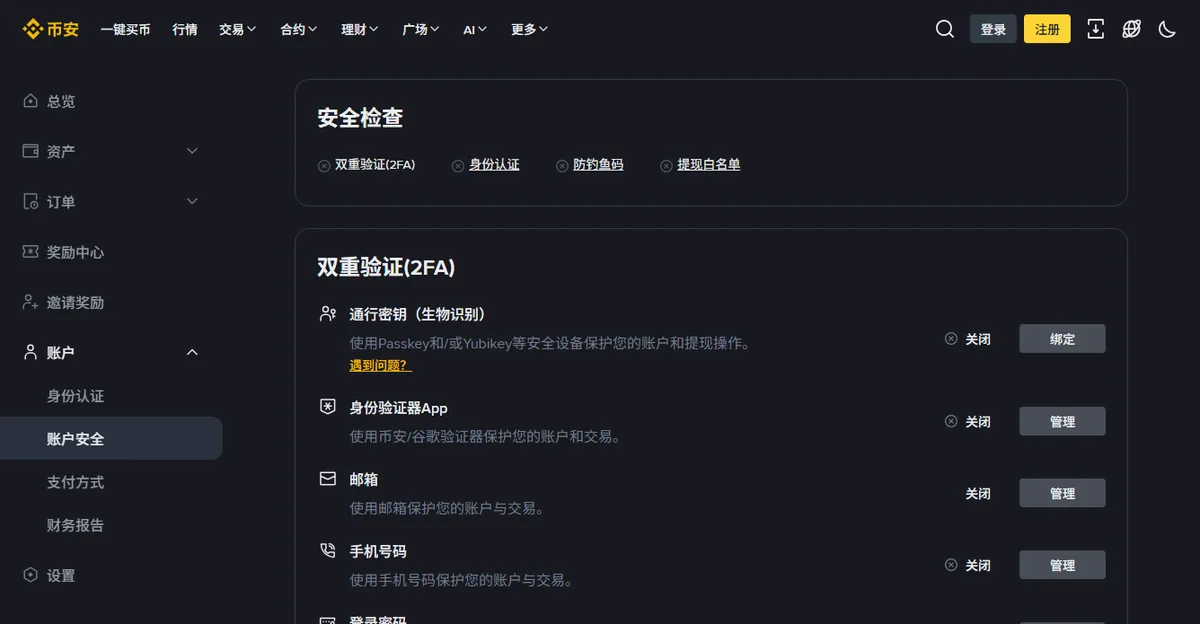
- The email address behind the account
- Two-factor that is not SMS
- A withdrawal address whitelist
- An anti-phishing code
Four settings, maybe fifteen minutes. Most accounts that get emptied were not broken into by anyone clever. They had one of these four standing open, and somebody walked through it.
They are listed in the order they matter, which is not the order the settings page presents them in.
Four doors, then some
- 1. The email is more important than the password
- 2. Use an authenticator, keep SMS as backup
- 3. The whitelist is the one that saves you
- 4. Anti-phishing code, and knowing what is real
- A few more worth doing while you are there
- Do not keep everything in one place
- Leave yourself a note
- If something has already happened
1. The email is more important than the password
People harden the exchange password and leave the email account it hangs off protected by something they chose in 2015. That is backwards. Whoever controls the email controls the recovery flow, and the recovery flow controls the account.
So: the email account gets its own strong, unique password. Long and unique beats clever, which is what both NIST SP 800-63B and CISA now recommend — and its own two-factor, before you touch anything on the exchange. If you use the same password anywhere else, change it there too. Credential stuffing is automated and it is patient.
Worth checking once: Have I Been Pwned will tell you whether that address already appears in a known breach. A quiet advantage of a dedicated address used for nothing else: any message arriving at it that is not from the exchange is, by construction, suspicious. That is a filter you get for free.
2. Use an authenticator, keep SMS as backup
SIM swapping is neither exotic nor rare. Someone persuades a carrier to move your number to their device, and every SMS code goes to them. It is documented, it is prosecuted, and it keeps happening.
An authenticator app generates time-based one-time codes on the device itself. Nothing is transmitted, so there is nothing to intercept or redirect.
Save the recovery codes when you enable it. Offline, on paper or in a password manager, not as a screenshot in your camera roll. A lost authenticator with no recovery codes turns into an identity-verification process that takes weeks, and you go through it with the account locked.
What SMS is still good for
Keep it enabled as a secondary factor if the platform allows both. Not as your primary — as the thing that notices. An SMS you did not request is an early warning that someone is working on your account.
3. The whitelist is the one that saves you
If you only do one thing on this page, do this one.
Every other setting tries to prevent access. The withdrawal whitelist limits what an attacker can do once they already have it.
With a whitelist enabled, funds can only be sent to addresses you have pre-approved. Adding a new address triggers a cooling-off period — typically measured in hours — during which withdrawals to it are blocked and notifications go out. The practical effect: an attacker with your password, your session and even your second factor still cannot move funds anywhere you have not already authorised. They have to wait out the delay, and the delay is when you find out.
Two things that go with it
Set it up while the account is calm, not when you are in a hurry to withdraw. And add your own destination addresses to it in advance, so the cooling-off period does not surprise you at the moment you actually need the money.
4. Anti-phishing code, and knowing what is real
You set a short phrase, and the platform includes it in every genuine email it sends you. Any message claiming to be from them without that phrase is not.
This converts a judgement call — does this email look right — into a lookup, and lookups are much harder to get wrong when you are tired or in a hurry.
Rules that are worth more than any setting
- Never reach the exchange through a link in an email. Use your own bookmark, every time.
- No genuine support process ever asks for your password, your codes or your seed phrase. Not once, not "to verify you".
- Anyone who contacts you first, on any platform, offering to help with your account is not from the exchange.
- Urgency is the tell. "Your account will be frozen in one hour" is a technique, not a deadline.
A few more worth doing while you are there
- Review active sessions and devices. Log out anything you do not recognise or no longer use.
- Turn off unused products. Margin, futures, API keys. Every enabled feature is a surface you are not watching.
- Check the notification settings. Withdrawal and login alerts on, delivered somewhere you actually read.
- Delete stale API keys. A key created for a tool you stopped using two years ago still works.
Do not keep everything in one place
Assets on an exchange are a claim against that exchange. That is not a warning about any particular platform; it is what custody means. Platforms have restricted withdrawals, delisted assets, and stopped serving regions with limited notice.
A workable split: what you are actively trading stays on the exchange, and what you are simply holding goes somewhere you control. The proportion depends on how much of it there is and how well you sleep.
Self-custody is not automatically safer
Worth being honest about, because the advice usually stops at "not your keys, not your coins". Holding your own keys moves the risk rather than removing it. From platform failure to your own backup discipline. Lost seed phrases are irreversible in a way that a frozen account is not, and there is no support queue.
Personally, we would rather see someone leave a modest balance on a well-run exchange with a whitelist enabled than move it to a wallet whose recovery phrase exists only in one photo on one phone. That is a view about the failure modes, not a recommendation about any product.
Leave yourself a note
Somewhere offline, write down which exchange, which email, where the recovery codes are, and where the seed phrase is if there is one. Not the secrets themselves — the map to them.
This is for the version of you who has lost a phone, and for whoever has to deal with your accounts if you cannot. Both are more likely than being hacked.
If something has already happened
Order matters, and the instinct to check first is wrong. Cut access before investigating.
- Change the email password and revoke its sessions.
- Change the exchange password and log out all devices.
- Disable and re-enrol two-factor.
- Check and clear the withdrawal whitelist.
- Check for API keys you did not create.
- Then contact support, with times and details.
Whatever the attacker was going to take is already gone or already blocked. What you are protecting now is everything they have not reached yet.