Say you were buying USDT on Binance P2P, sent the Hong Kong dollars by FPS, and came back to find the order marked "Canceled". At that moment your HKD is sitting in the seller's bank account, and the USDT that was held in escrow has gone back to the seller. Neither the bank nor Binance will reverse either side on its own.
There is one proper route: open that canceled order, tap Need Help, choose the reason "I paid but the order is cancelled", and attach video proof of the payment. Before you do anything else, hold off on three things: don't pay a second time, don't follow a "new order" or link the seller sends you privately, and don't delete or hide the transfer record in your banking app.
Five steps, in the order you'll need them
How an order gets canceled after you've paid
Work out which of these happened before you file anything. You'll need to describe it, and one of them is how a scam usually starts.
- The payment timer ran out. You sent the money but never went back to the order to confirm you'd paid. When the countdown hit zero the system canceled the order and released the escrowed coins to the seller. This is the first case covered in Binance's P2P Appeal Handling Rules.
- Someone pressed Cancel. It may have been you, by mistake, or the seller. Your appeal should say which, so pin it down first; if you genuinely aren't sure, say that.
- The seller talked you into canceling. "The system is stuck, cancel and I'll open a new one." "Cancel and I'll refund you directly." Binance’s August 2024 P2P safety article describes exactly this as the paid-but-canceled scam: the seller gets the money, persuades the buyer to cancel, then disappears.
Canceling is what hands the escrowed coins back to the seller. After that, the appeal is the only lever you still hold.
Can your bank pull an FPS payment back?
Don't plan on it. The Hong Kong Monetary Authority's public education video on avoiding wrong transfers puts it plainly: once a transfer instruction has been executed, the transaction cannot be stopped. FPS settles in real time, so the money left your account the moment you confirmed.
The HKMA’s February 2025 circular supersedes the earlier HK$10,000 threshold. For an applicable real-time FPS transfer sent to a retail bank using the payee’s bank account number, HK$1,000 or more generally triggers the bank’s name check. Checks can also apply below that amount, depending on the bank. Confirm the name and account details yourself before paying.
A call to your bank is still worth making, though not to ask for a reversal. Confirm the status of the transfer and its transaction reference number, and keep a screenshot or written note of what they tell you. That is your evidence for the appeal.
Appealing a canceled order, screen by screen
The entry point isn't the chat window or the support home page. It's inside the canceled order itself. Binance's help article on appealing canceled or completed P2P orders (updated 12 March 2026) gives this path in the app:
- Go to [Trades] and then [P2P], and tap [Orders] at the bottom.
- Tap [Fulfilled], then [Canceled], and find the order you paid for.
- Open it and tap [Need Help].
- Pick [I paid but the order is cancelled], then tap [Appeal].
- Describe what happened in as much detail as you can, attach screenshots, and tap [File an Appeal].
On the website it's [Orders] → [All Orders] → [Canceled] → the order → [Need Help]; the reason there is labelled [Order canceled but Paid], followed by [Appeal] and [Submit Appeal].
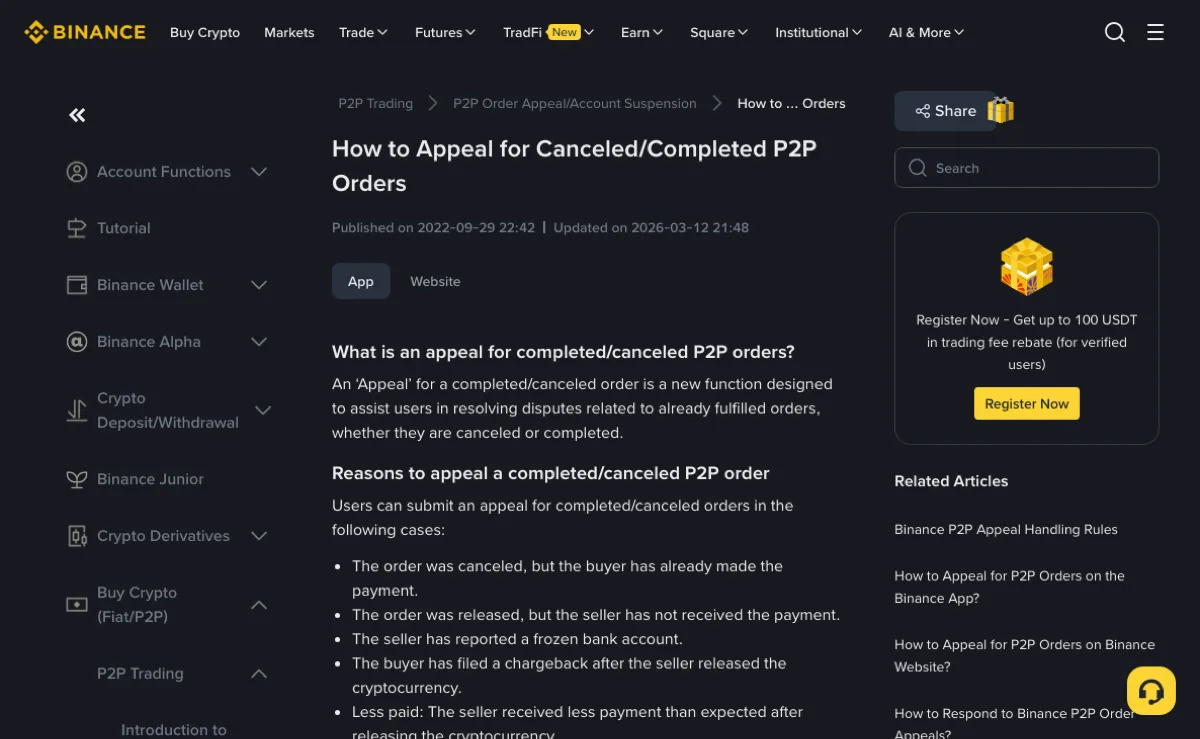
The tips section asks for "detailed information and valid Video Proof of Payment" but doesn't spell out what the video should show. For an FPS payment, a single unedited screen recording that does the following leaves little room for doubt: open your banking app, go to the transaction history, tap into this payment so the payee name, amount, time and reference number are on screen, then switch to the Binance order so the order number and amount appear in the same clip.
| How it was canceled | Reason to select | The one extra thing that helps most |
|---|---|---|
| Timer expired, system canceled it | I paid but the order is cancelled | The bank's timestamp showing you paid before the cancellation |
| You tapped Cancel by mistake | I paid but the order is cancelled | Order-chat messages where you told the seller you had paid |
| The seller canceled, or pushed you to | I paid but the order is cancelled, with the pressure described in your write-up | Chat screenshots of the seller asking you to cancel or promising a refund |
Write the explanation as a timeline: when you placed the order, when you paid, when you noticed it was canceled, and what you and the seller said in the order chat around that time. If the seller admits in the chat that the money arrived, screenshot it. Nothing else you submit will carry as much weight.
After the appeal: how far Binance's rules go
Binance's P2P Appeal Handling Rules (last updated 15 October 2024) open with a scope line: "This rule applies to non-CNY trades only." An HKD order is inside that scope, so these clauses apply to you directly:
- Order canceled automatically after the time limit, buyer already paid: Binance customer service "will contact the seller for a refund on a best effort basis."
- Seller refuses: "Binance is not liable for any loss resulting from the transaction."
- Buyer paid into an account other than the one in the order's payment details, or into a third-party account: Binance is not liable and "a refund is not guaranteed".
Put together, the promise is to contact the seller, not to refund you. Whether the money comes back depends on two things: whether the seller agrees, and whether you paid the account named on the order. If the seller asked in chat for payment to a different account or FPS ID, the third clause is the one that applies.
On timing, the appeal article says to allow the support team 15 to 30 minutes to review and respond. Cases that need the other party's input take longer, and no overall deadline is given. Keep an eye on your email and app notifications, because a quick reply when support asks for more evidence helps.
CNY orders are outside these rules
Because the rules are written for non-CNY trades only, the clauses above can't be read across to a CNY order. For how escrow disputes work in general, see the section on stalled orders in Buying USDT through P2P.
"The order can be reactivated, just pay again"
Don't. Binance's July 2025 safety article on payments to canceled orders (published in Chinese) says that when an order is canceled or expires, the crypto goes back to the seller, and a canceled order cannot be reactivated. Its advice is to send no payment at all in that situation.
The pattern it describes: an ad priced well below the market draws you in; once you order, the seller stalls, gives wrong payment details or moves the chat off Binance; after the order lapses, they come back offering to "extend" or "restore" it, sometimes with a fake screenshot of an order page. Whatever you pay then has no order behind it, and so no escrow.
The test is simple. Before you pay, the order page must show the order as in progress, with the timer still running. If it doesn't, nothing the seller says changes that. If you've already paid twice this way, put both payments in the same appeal, along with the chat and whatever screenshots the seller sent.
Every one of these situations turns on the minute or two around the payment: check the payee name and order status before paying, confirm on the order page as soon as the transfer goes through, and once you've paid, leave Cancel alone. The full FPS buying flow and how to read HKD prices are in Buying USDT with HKD via FPS; the selling-side risks are in Selling crypto for cash.