Binance Convert really does charge no trading fee. The first answer in its FAQ says so. What it gives you instead is a quote that is not the market price, and that is where the cost lives. So the useful comparison is not fee against fee. It is the amount you end up holding: the number in the Convert preview, set against what a spot market order would deliver after the spot fee comes off. The gap between those two numbers is what the spread cost you on that trade.
The size of that gap moves with the pair, the trade size and the order book at that moment. The Convert figure is right there in the preview; the spot figure you work out from the book, step by step in the second section. The fourth covers the cases where the answer flips.
Convert or spot
What a Convert quote includes
Strip the official FAQ down to the lines about cost and four points remain:
- No fee on top. "There are no fees for using Binance Convert", and "the quoted amount of assets shown is the actual amount of assets you will receive in your account once the conversion is executed."
- The quote differs from the last traded price on purpose. FAQ item 9: last traded prices "do not include trading fees or factor in the size of your trade". Convert quotes from current market conditions and holds the price for a short review window before executing.
- The quote expires quickly. The Q&A on each pair page says the amount is only valid during a short countdown, after which you refresh.
- Who can use it, and for how much. You must be logged in and have completed identity verification to confirm a trade. Minimum and maximum amounts depend on the pair and are shown before you type a number. Available pairs can vary by country or region.
Put together: nothing is charged outside the quote, because the cost is already folded into it. That is why "zero fees" on its own settles nothing.
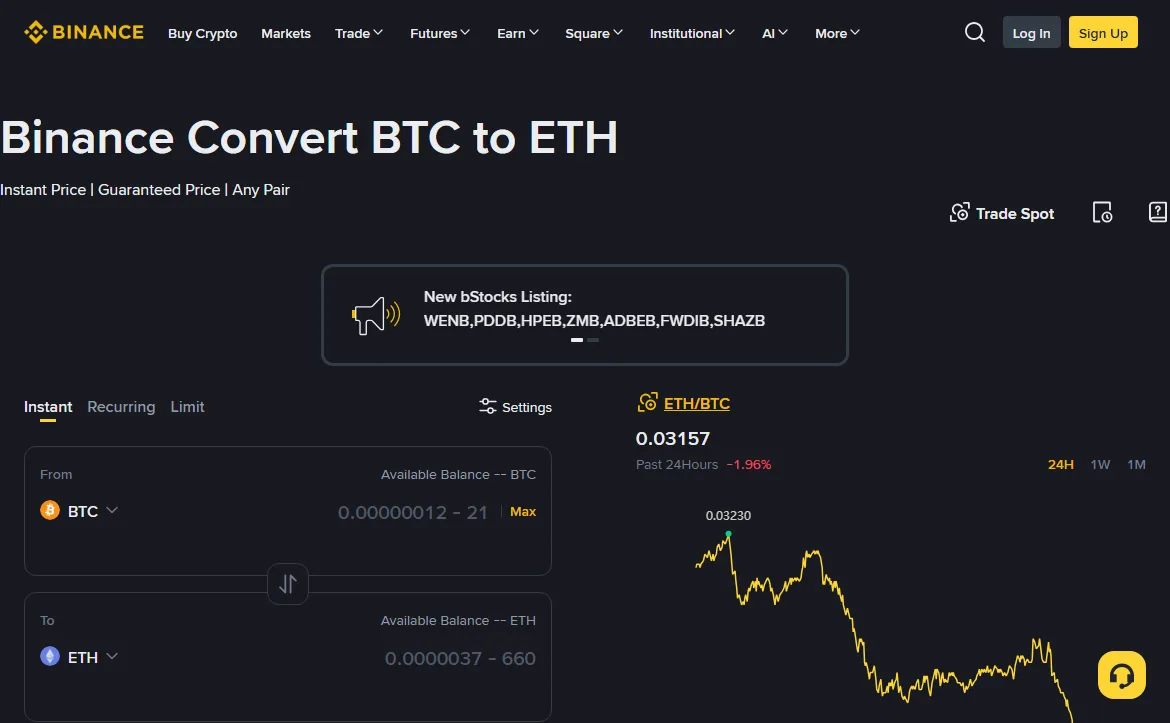
Three steps to compare one trade
Take an invented example: you hold 0.1 BTC and want ETH. Every number below is made up to show the arithmetic. Yours will differ; the method will not.
- Type 0.1 BTC into Convert and note the ETH figure in the preview. Say it shows 3.1580 ETH. Do not confirm yet. That figure is your Convert result.
- Open the ETH/BTC spot order book and read the best ask. Paying BTC for ETH with a market order means you take the sellers' side, so the number you want is the lowest ask (shown in red by default), not the last trade. Say the best ask is 0.03160 BTC. 0.1 / 0.03160 ≈ 3.16456 ETH.
- Take the spot fee off. On the spot fee rate page (opened October 2026), a Regular User pays 0.100% maker and 0.100% taker; the rate the page shows live is the one to use. 3.16456 × 0.999 ≈ 3.16139 ETH.
| Stage | Convert | Spot market order |
|---|---|---|
| Price used | Preview quote, locked for the countdown | Best ask, 0.03160 |
| Before fees | 3.1580 ETH | 3.16456 ETH |
| Fee | None; the quote is what you get | 0.100% (Regular User, October 2026) |
| You end up with | 3.1580 ETH | ≈ 3.16139 ETH |
The bottom row differs by about 0.0034 ETH, roughly 0.11%. That is what the Convert spread cost on this trade compared with a spot taker order.
With BNB fee deduction switched on, step three uses the deducted rate instead (0.075% for a Regular User on the same page, October 2026), and the spot side gains a little more. On larger trades, the best ask alone is not enough: if the volume sitting at that price is smaller than your order, the rest fills at the next levels up. Add up the book level by level until it covers your amount, work out the average price, and use that in step two.
Three ways the comparison goes wrong
Using the last traded price
The big number on a market page is the price of the previous trade, not the price of your next one. Binance makes this exact point in the Convert FAQ. Compare against it and spot looks cheaper than it is.
Leaving out the spot fee
The Convert quote already has its cost inside it; the spot price does not. Deduct on one side only and the gap inflates. In the example above, skipping the fee would show a gap of about 0.2%, close to double the real figure.
Reading the two sides at different moments
The Convert countdown is short. Get a quote first and then wander off to do sums on the spot page, and the quote will have expired and the market moved by the time you finish. Reverse the order: note the spot book, then go straight back to Convert and request the quote, so the two readings sit close together.
When Convert can be the cheaper route
"Spot always beats Convert" does not hold up. Three situations deserve an actual calculation.
There is no direct spot market between the two coins. Spot then takes two legs, usually selling into USDT and buying the target coin. That is two taker fees, one per leg, plus the spread twice. Convert stays a single quote.
The amount is tiny, or it is leftover dust. The pair pages state that Convert handles small balances. Spot pairs each set a minimum order size, which the order form will flag; below it you cannot place the order, or you are left with an odd remainder.
The order book is thin. On less traded coins the first and second ask can be far apart, and a market order walks through several levels at once. Here the level-by-level averaging matters most. Do it, then compare.
Note the word "can": in each of these cases Convert may still turn out dearer.
When spot is the better fit
Between major coins with a direct pair and a deep book, a spot taker order usually still leaves you slightly more after its fee than the Convert quote does. The worked example has that shape. Spot also has two levers Convert lacks:
- BNB fee deduction. With it on, a Regular User's spot rate drops from 0.100% to 0.075% (spot fee rate page, opened October 2026; the rate the page shows live settles the exact figure). Convert has no separate fee, so this deduction has nothing to act on there, and the same goes for any other discount that applies only to fees.
- Maker orders. Worth being precise: at the Regular User tier the fee schedule lists the same rate for maker and taker. The maker discount starts at VIP 1. For most new accounts, a limit order is about setting your own price and not paying the spread, not about a lower fee.
For an occasional swap of a modest amount, a gap of a few tenths of a percent is a fair price for the convenience of Convert. If you swap often, or the sums are large, the minute spent on the three steps pays for itself.
One more detail sits at the bottom of the fee schedule: trading volume counted toward VIP tiers includes spot, margin, Convert, copy trading and trading bots. Whatever you swap through Convert still counts toward your tier.
Convert's Limit tab is not a resting order
The Convert page has a Limit tab where you name a price and wait. It looks like a spot limit order. Two differences matter.
First, it still runs on Convert quotes. It does not go into the order book and there is no maker or taker. When it executes, the FAQ says, the assets convert exactly at your limit price.
Second, touching the price is not the same as filling.
FAQ item 8, in its own words
"Limit mode orders are executed subject to market conditions and may not be completed even if the market price reaches or crosses your limit price momentarily." A spot limit order sits in the book and can be hit when the price arrives; a Convert limit also depends on the quote conditions at that moment. If you need the trade to happen, do not treat it as a substitute for a resting order.
To put the Convert spread, the spot fee and your discounts on one scale, enter the percentages in the effective fee calculator. How the spot fee layers stack is broken down in how Binance fees actually stack. Convert needs a verified account; if you have not opened one yet, start with the sign-up walkthrough.
Official sources, opened and checked in October 2026: Binance Convert FAQ, the Q&A on the BTC-to-ETH Convert page, spot trading fee rates.